 Magezon Blog Help Merchants Build Comprehensive eCommerce Websites
Upgrading your website builder should never mean starting from scratch.
If you’ve been using Magezon Page Builder 1 to create rich, dynamic content, you already know how much time and effort goes into designing each page. Rebuilding everything manually just to move to a newer version? That’s a major setback.
That’s why we’re excited to introduce the Page Builder 2 Converter — a powerful feature that helps you seamlessly convert your existing content into Page Builder 2 in just a few clicks.
Table of contents
What is Page Builder 2 Converter?
Page Builder 2 Converter is a smart migration tool that allows you to transform content created with Page Builder 1 into Page Builder 2 format automatically.
Instead of recreating pages from scratch, you can now:
- Keep your existing layouts
- Preserve your design structure
- Save hours (or even days) of manual work
Whether you’re a store owner, developer, or agency, this feature is designed to make your upgrade process smooth and efficient.

Why This Feature Matters
Migrating content is often the biggest barrier when upgrading systems. With Page Builder 2 Converter, you can:
- Save Time & Effort: No need to rebuild pages manually.
- Reduce Errors: Avoid inconsistencies that come with manual recreation.
- Lower Costs: Minimize development time and resources.
- Maintain Design Consistency: Keep your existing layouts intact across versions.
How It Works
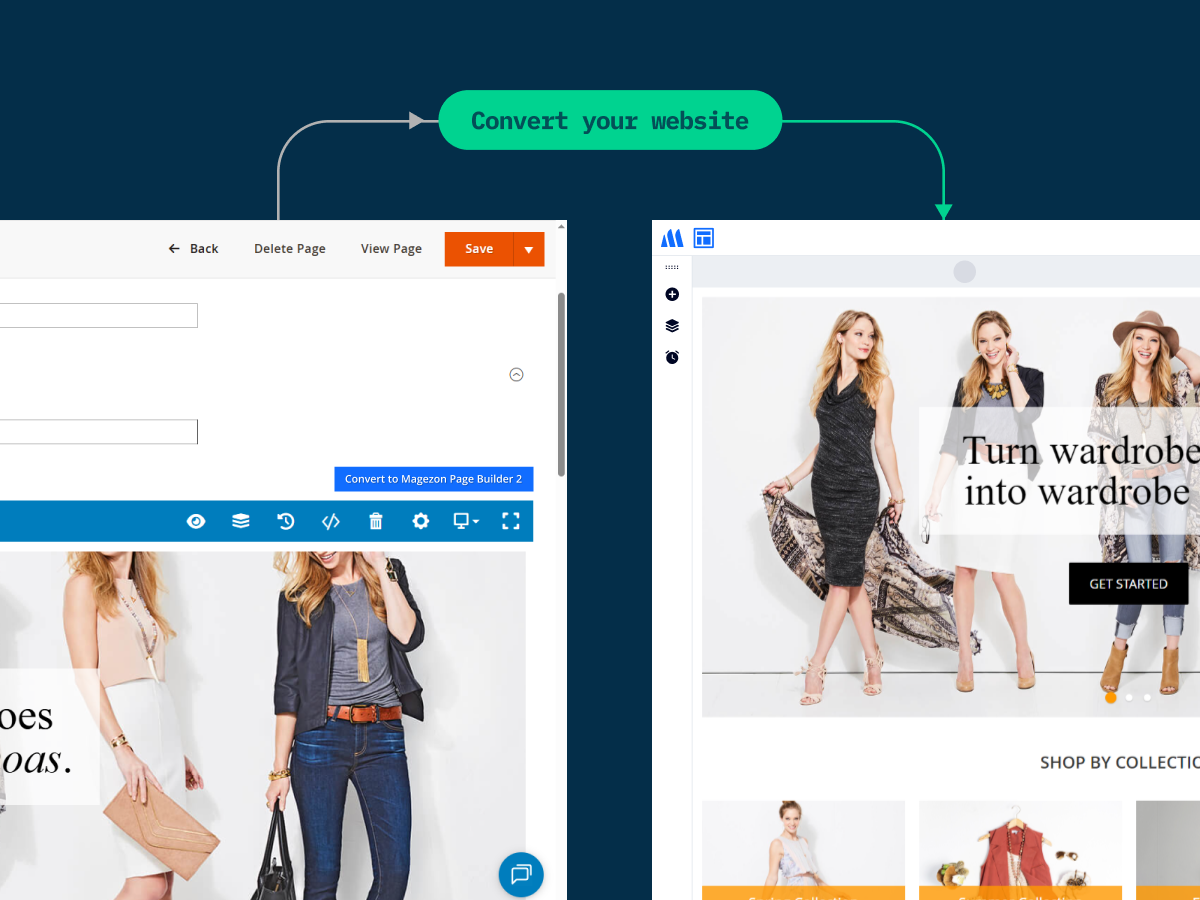
Using the converter is simple:
- Purchase and install Page Builder 2
- Open the page or content created in Page Builder 1
- Click the Convert button
- The system automatically converts it into Page Builder 2 blocks
Within seconds, your content is ready in the new builder — structured, organized, and editable. If the system detects unsupported block types, you will receive a notification with a list of those blocks, allowing you to decide whether to continue the conversion.
Note: If you are currently using Page Builder 1 and would like to upgrade to Page Builder 2, you will need to purchase Page Builder 2 from our website with an annual subscription. We offer a 30% upgrade discount in the first year — please contact us to receive your coupon code.
Key Features
- One-click conversion for instant migration
- Smart content mapping between Page Builder versions
- Layout and styling maximum preservation
- Support for most common elements and blocks
- Clear notifications for unsupported blocks
Important Notes
While the converter handles most content seamlessly, there are a few things to keep in mind:
- Some unsupported blocks will not be converted or displayed in Page Builder 2, including Image Gallery, Pinterest, Pricing Table, Raw JS, Single Product, Slider, Template, Toggle, Facebook Button, and X Timeline.
- Minor adjustments may be required after conversion
- Content can only be edited in Page Builder 2 after conversion.
- We recommend reviewing your pages to ensure everything looks perfect
If you encounter unsupported blocks, feel free to contact our support team — we’re here to help you find the best solution.
Get Started Today
Ready to upgrade without the hassle?
Try the Page Builder 2 Converter today and experience a faster, smarter way to migrate your content.
If you need help converting unsupported blocks or optimizing your pages, don’t hesitate to reach out to our team.
FAQs
Yes. The converter is designed to preserve your layout and styling as much as possible. However, minor adjustments may be needed in some cases.
Some blocks cannot be converted, including Image Gallery, Pinterest, Pricing Table, Raw JS, Single Product, Slider, Template, Toggle, Facebook Button, and X Timeline.
These blocks will be skipped and will not appear in Page Builder 2 after conversion.
Unsupported blocks will be skipped during the conversion process. You will receive clear notifications so you can review and decide whether to continue converting.
Yes, but only in Page Builder 2. After conversion, the content can no longer be edited using Page Builder 1.
Yes. You need an active Page Builder 2 annual subscription to convert and edit content.
We offer a 30% upgrade discount in the first year for existing Page Builder 1 users. Please contact us to receive your coupon code.
The conversion process is fast and typically takes just a few seconds, depending on the complexity of your content.
No. For now, conversion is typically performed per page/content.
We recommend reviewing your content after conversion and making minor adjustments if needed. If you need help, feel free to contact our support team.